Updated June 2026. Prices and features below are 2026 estimates compiled from vendor websites and published industry data — always confirm current pricing and confidentiality terms with each vendor before you buy.
Quick answer: For most law firms, Smith.ai is the best AI receptionist — it runs your intake script, screens for conflicts, and pushes new-client details straight into Clio, MyCase, or PracticePanther, with live human agents as backup. Solo and small firms on a budget get the best value from Rosie ($49/mo), and firms that want a flat, unlimited rate should look at My AI Front Desk. Expect roughly $95–$400/month depending on call volume and whether you add human backup.
Our top picks at a glance
- Best overall for law firms: Smith.ai — legal intake scripts, conflict screening, native Clio/MyCase/PracticePanther sync, AI + human.
- Best value for solo & small firms: Rosie — from $49/mo, fast setup, no per-call meter.
- Best flat-rate, unlimited calls: My AI Front Desk — predictable monthly pricing for higher volume.
- Best dedicated legal intake service: Dialzara — purpose-built for prospective-client intake calls.
- Best human-heavy hybrid: Ruby / AnswerConnect — established legal answering with a lighter AI layer.
AI receptionist for law firms comparison (2026)
| Tool | Best for | Starting price* | Legal CRM integration | Conflict screening | AI + human? |
|---|---|---|---|---|---|
| Smith.ai | Most law firms | ~$97.50/mo (AI) · ~$293/mo (hybrid) | Clio, MyCase, PracticePanther, Smokeball, Lawmatics | Yes (script-based) | Yes |
| Rosie | Solo / small firms, budget | $49/mo ($149 for booking) | Calendar-based (Google, Calendly, Acuity) | Basic Q&A only | AI only |
| My AI Front Desk | Flat-rate, higher volume | ~$65–$100/mo | Zapier-based | Basic Q&A only | AI only |
| Dialzara | Dedicated legal intake | From ~$29/mo (usage-based) | Integrations via Zapier | Script-based | AI only |
| Ruby / AnswerConnect | Human-heavy hybrid | ~$235–$325/mo | Clio & major legal CRMs | Human-handled | Human-led |
How we evaluated these tools
This guide is independent — we don’t sell an AI receptionist, and no vendor paid for placement. For a law firm, the bar is higher than “answer the phone,” so we judged each tool on what intake actually requires:
- Real intake, not message-taking: can it run your practice-area intake script and qualify a prospective client, not just take a name and number?
- Conflict screening: can it ask conflict-of-interest questions against your instructions and flag potential conflicts before you call back?
- Legal CRM sync: does it push the new matter into Clio, MyCase, PracticePanther, Smokeball, or Lawmatics automatically?
- Confidentiality: how does it handle sensitive caller information, recordings, and data security?
- Speed and coverage: does it answer instantly, 24/7, so you win the client who calls five firms at once?
Editor’s note: We base rankings on documented features, transparent pricing, integrations, and verified user reviews. Before you commit, run a live test intake call through any shortlisted tool with a realistic scenario for your practice area.
Why law firms are switching to AI receptionists
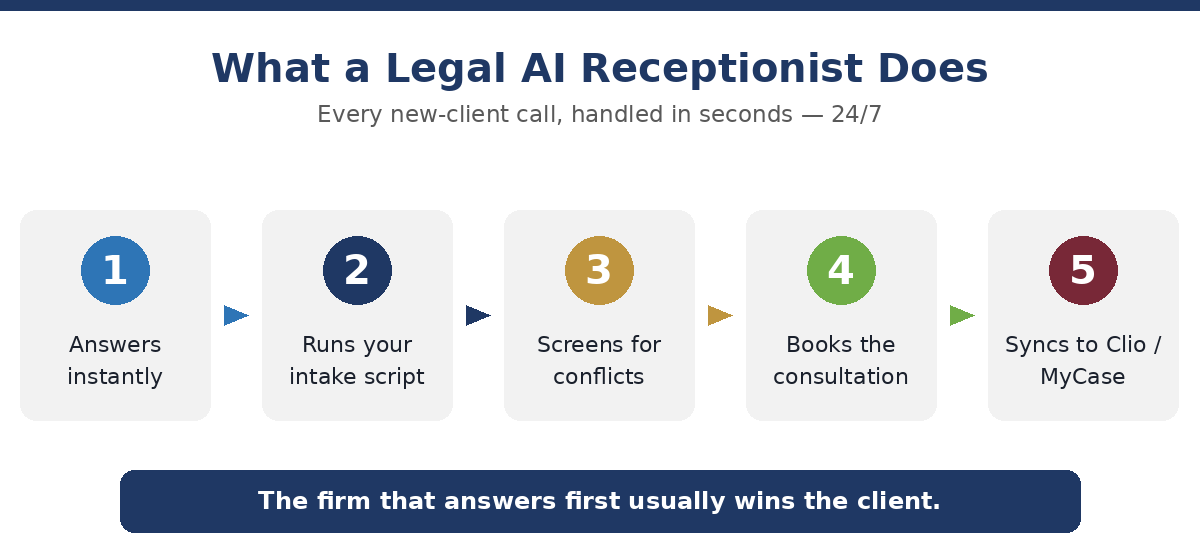
In legal, the firm that answers first usually wins the client. Prospective clients with an urgent problem — an arrest, an accident, a deadline — rarely leave a voicemail. If your line rings out during a hearing or after hours, that caller dials the next firm on their list, and a potential case worth thousands walks away.
An AI receptionist answers every call in seconds, 24/7, runs your intake questionnaire, screens for conflicts, books the consultation, and drops the details into your case management system before you’ve left the courtroom. It doesn’t replace your team — it stops new-client revenue leaking through unanswered phones.
1. Smith.ai — best overall for law firms
Best for: firms that want serious legal intake with a human safety net.
Smith.ai is the most law-firm-focused option on this list. Its receptionists (AI, human, or both) work from your supplied intake scripts, can run conflict-screening questions against your instructions, and push captured intake into Clio, MyCase, PracticePanther, Smokeball, Lawmatics and dozens of other legal platforms. Intake questionnaires are customizable down to individual practice areas. Pricing starts around $97.50/month for the AI tier (30 calls) and roughly $293/month for hybrid AI + human plans; conflict checks may be a small per-call add-on.
Strengths: deepest legal CRM integration, true intake + conflict screening, human fallback for sensitive calls.
Who it’s NOT for: solo attorneys who just want basic 24/7 answering at the lowest possible price.
2. Rosie — best value for solo & small firms
Best for: solo attorneys and small firms that want 24/7 answering without enterprise pricing.
Rosie starts at $49/month and answers callers using your firm’s details, with no per-minute meter on entry plans. Appointment booking unlocks on the $149/month Scale plan, connecting to Google Calendar, Calendly, and Acuity. It won’t run deep conflict screening or sync to a legal CRM, but for a lean practice that just needs to stop missing calls, it’s the easiest and cheapest way in.
Strengths: lowest entry price, fast setup, no per-call charges.
Who it’s NOT for: firms that need legal CRM sync or formal conflict checks.
3. My AI Front Desk — best flat-rate option
Best for: firms with higher call volume that want predictable monthly costs.
My AI Front Desk offers AI answering at a flat monthly rate with Zapier-based integrations, so you avoid per-call surprises. It’s a solid mid-budget pick for firms that get steady call volume and want 24/7 capture, though it lacks the legal-specific intake depth of Smith.ai.
Strengths: predictable pricing, quick to launch, flexible integrations.
Who it’s NOT for: firms that need native legal CRM sync and conflict screening.
4. Dialzara — best dedicated legal intake
Best for: firms that want an AI built around prospective-client intake.
Dialzara focuses on legal intake answering — it runs structured intake scripts and qualifies callers, with usage-based pricing that can start low for lighter volume. It’s a credible specialist alternative if Smith.ai’s human-hybrid model is more than you need.
Strengths: intake-focused, usage-based entry pricing.
Who it’s NOT for: firms wanting a live human option on the same plan.
5. Ruby / AnswerConnect — best human-heavy hybrid
Best for: firms that prefer trained human receptionists with a lighter AI layer.
Ruby and AnswerConnect are long-established legal answering services now adding AI. If you value a real person handling every sensitive intake call and only want AI for overflow or after-hours, these are the safer (if pricier) choice, typically $235–$325/month depending on volume.
Strengths: trained human receptionists, established reputations, legal CRM support.
Who it’s NOT for: budget-conscious firms or those wanting AI-first automation.
How much does an AI receptionist for a law firm cost?
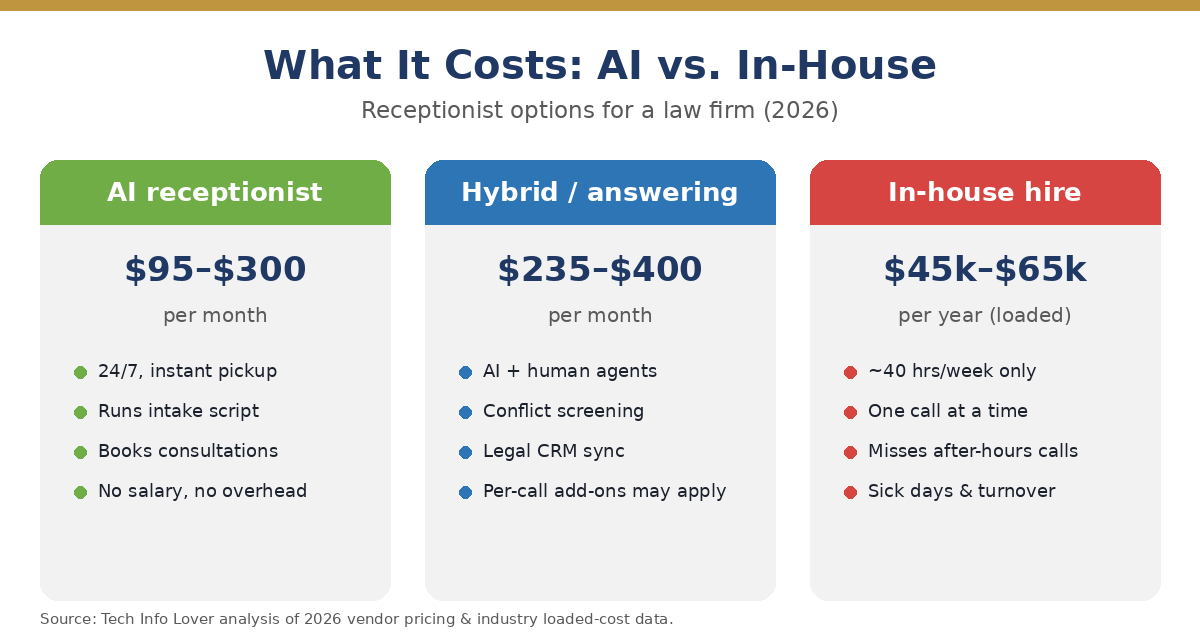
AI-first plans run roughly $95–$300 per month; hybrid AI + human and dedicated legal answering services run $235–$400+ per month, sometimes with per-call or conflict-check add-ons. Compare that to a full-time in-house receptionist at a loaded cost of $45,000–$65,000 per year who covers about 40 hours a week and takes one call at a time. Because a single signed matter can be worth thousands, recovering even one missed intake a month typically pays for the service many times over.
Confidentiality and conflicts: what to verify first
Intake calls contain sensitive, sometimes privileged information, so due diligence matters. Before going live, confirm the vendor encrypts call data, limits who can access recordings and transcripts, and supports your conflict-of-interest workflow. If a tool can’t screen for conflicts or store intake securely, restrict it to basic answering and capture detailed intake yourself. When in doubt, check your jurisdiction’s rules of professional conduct on confidentiality and the use of third-party intake providers.
How to choose the right one for your firm
- Start with intake depth. Need real intake + conflict screening + Clio/MyCase sync? Shortlist Smith.ai (or Dialzara).
- Match it to your size. Solo/small → Rosie. Steady volume → My AI Front Desk. Human-first → Ruby/AnswerConnect.
- Confirm confidentiality. Encryption, access controls, and a workflow for privileged information.
- Run a live test intake. Call in as a prospective client for your practice area and judge the qualification and conflict questions.
- Check the real price. Watch for per-call fees, conflict-check add-ons, and overage charges.
Frequently asked questions
Can an AI receptionist run my law firm’s intake script?
Yes. Legal-focused tools like Smith.ai run your practice-area intake questionnaire, qualify the caller, and can ask conflict-of-interest questions against your instructions, then sync the new matter into Clio, MyCase, or PracticePanther.
Can it check for conflicts of interest?
Some can. Smith.ai and dedicated legal intake services can run script-based conflict-screening questions and flag potential conflicts for your review, sometimes as a small per-call add-on. Budget AI tools generally cannot — you’d handle conflicts yourself.
Is an AI receptionist confidential enough for legal calls?
It can be, if you choose a vendor that encrypts data, restricts access to recordings and transcripts, and supports your conflict workflow. Always confirm security practices and check your jurisdiction’s professional-conduct rules before sharing client information.
How much does an AI receptionist for a law firm cost?
AI-first plans run about $95–$300 per month; hybrid AI + human and legal answering services run $235–$400+ per month, sometimes with per-call or conflict-check add-ons. Because one signed case can be worth thousands, the service usually pays for itself quickly.
The verdict
For most firms that want real intake, conflict screening, and legal CRM sync with a human backup, Smith.ai is the best AI receptionist for law firms in 2026. Solo attorneys and small firms who just need to stop missing calls should start with Rosie at $49/mo, and higher-volume firms wanting a flat rate should look at My AI Front Desk. Whatever you choose, confirm confidentiality and run a live test intake before you rely on it.
Related: AI Receptionist Cost in 2026 · 7 Best AI Receptionists for Small Business · What Is an AI Receptionist?